

Folder structure and file naming
01 Abbreviations
02 File handling
03 Folder structure
04 File naming
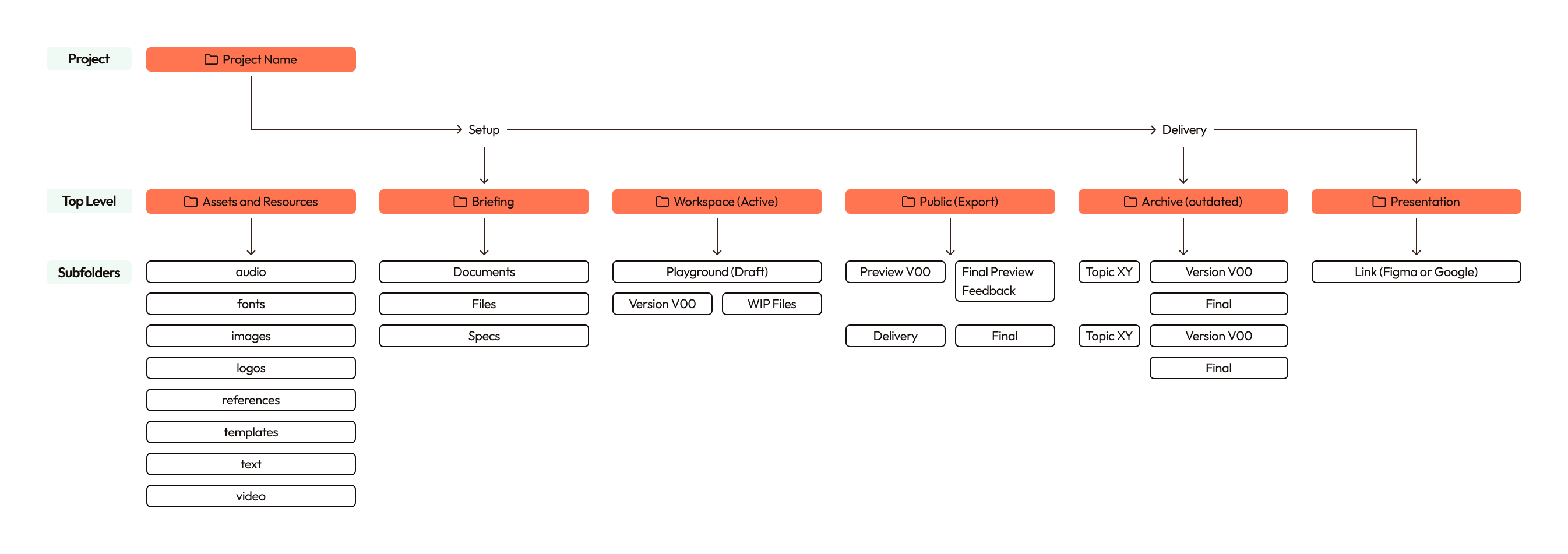
In order to enable identical ordering systems across projects and seamless navigation through files, we would like to suggest a folder structure. This should be understood as a recommended guideline that can be expanded and modified depending on the topic.

Abbreviations
In files, we abbreviate
- Gelbe Seiten as GS
- Das Örtliche as OE
- Das Telefonbuch as TB
File handling

I receive a file and store it
When I receive a file, I make sure that the file name complies with the naming convention and store it in the project folder accordingly. If not, I’ll feedback and suggest a new name.

I create a file for a project and save it
I am the main author of a file and make sure at the outset that it is saved in the project folder and complies with the naming convention.

I release a file for external use
I want to give third parties access to a file, so I copy the internal version of the file to be shared. I store the copied file in an “External” folder within the system and share only this file specifically with external parties.
Folder structure
We distinguish between the project level, the parent project folder including the project name, the top level, which shows an overview of the different categories, and the subfolders, which subdivide the respective file formats and media types.
File naming
The following illustration shows the composition of a possible file structure. Elements colored in lighter shades are to be considered optional.
A possible file from January 02, 2026, could therefore be named, for example:
260102_GS_internal_Listing-2-0_Trefferliste-star-draft_SW_03.png
Underscores separate topics, hyphens separate related terms.


Back to top


Previous
topic
Next
topic
Home
GTC
Legal Notice
Terms of Use
Privacy Policy
Folder structure and file naming
In order to enable identical ordering systems across projects and seamless navigation through files, we would like to suggest a folder structure. This should be understood as a recommended guideline that can be expanded and modified depending on the topic.
01 Abbreviations
02 File handling
03 Folder structure
04 File naming
Abbreviations
In files, we abbreviate
- Gelbe Seiten as GS
- Das Örtliche as OE
- Das Telefonbuch as TB
File handling
I receive a file and store it
When I receive a file, I make sure that the file name complies with the naming convention and store it in the project folder accordingly. If not, I’ll feedback and suggest a new name.
I create a file for a project and save it
I am the main author of a file and make sure at the outset that it is saved in the project folder and complies with the naming convention.
I release a file for external use
I want to give third parties access to a file, so I copy the internal version of the file to be shared. I store the copied file in an “External” folder within the system and share only this file specifically with external parties.
Folder structure
We distinguish between the project level, the parent project folder including the project name, the top level, which shows an overview of the different categories, and the subfolders, which subdivide the respective file formats and media types.
File naming
The following illustration shows the composition of a possible file structure. Elements colored in lighter shades are to be considered optional.
A possible file from January 02, 2026, could therefore be named, for example:
260102_GS_internal_Listing-2-0_Trefferliste-star-draft_SW_03.png
Underscores separate topics, hyphens separate related terms.


Back to top

Previous
topic
Next
topic
Home
GTC
Legal Notice
Terms of Use
Privacy Policy
Folder structure and file naming
In order to enable identical ordering systems across projects and seamless navigation through files, we would like to suggest a folder structure. This should be understood as a recommended guideline that can be expanded and modified depending on the topic.
01 Abbreviations
02 File handling
03 Folder structure
04 File naming
Abbreviations
In files, we abbreviate
- Gelbe Seiten as GS
- Das Örtliche as OE
- Das Telefonbuch as TB
File handling
I receive a file and store it
When I receive a file, I make sure that the file name complies with the naming convention and store it in the project folder accordingly. If not, I’ll feedback and suggest a new name.
I create a file for a project and save it
I am the main author of a file and make sure at the outset that it is saved in the project folder and complies with the naming convention.
I release a file for external use
I want to give third parties access to a file, so I copy the internal version of the file to be shared. I store the copied file in an “External” folder within the system and share only this file specifically with external parties.
Folder structure
We distinguish between the project level, the parent project folder including the project name, the top level, which shows an overview of the different categories, and the subfolders, which subdivide the respective file formats and media types.
File naming
The following illustration shows the composition of a possible file structure. Elements colored in lighter shades are to be considered optional.
A possible file from January 02, 2026, could therefore be named, for example:
260102_GS_internal_Listing-2-0_Trefferliste-star-draft_SW_03.png
Underscores separate topics, hyphens separate related terms.


Back to top

Previous
topic
Next
topic
Home
GTC
Legal Notice
Terms of Use
Privacy Policy